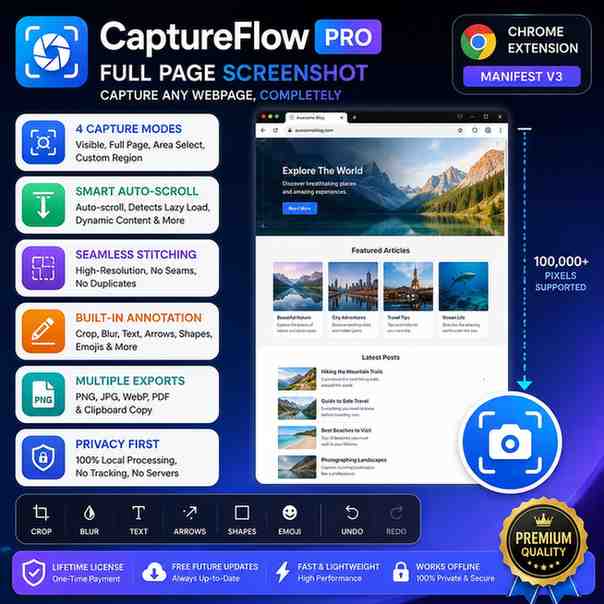
CaptureFlow Pro – Full Page Screenshot & Annotation
Capture any webpage in stunning high resolution with intelligent auto-scroll, seamless image stitching, built-in annotation tools, and one-click export. Fast, private, and works entirely offline.
- Instant delivery to your dashboard
- Genuine licenses, official sources
- 30-day support guarantee
- Earn 5% referral commission
About this product
🚀 CaptureFlow Pro – Ultimate Full Page Screenshot Chrome Extension
CaptureFlow Pro is a professional Chrome extension designed to capture entire webpages, scrolling websites, selected areas, or visible screens in stunning high resolution.
Unlike ordinary screenshot tools, CaptureFlow Pro intelligently auto-scrolls through webpages, detects lazy-loaded content, waits for dynamic elements to load, and seamlessly stitches multiple screenshots into one flawless image—all while processing everything locally on your computer for maximum privacy.
Whether you're a developer, designer, marketer, student, researcher, or content creator, CaptureFlow Pro helps you capture every detail with speed, precision, and ease.
✨ Key Features
📸 4 Powerful Capture Modes
- Visible Screen Capture
- Full Page Screenshot
- Area Selection (Drag & Select)
- Custom Region Capture
🚀 Smart Auto Scroll
- Automatically scrolls long webpages
- Detects lazy-loaded images and videos
- Waits for dynamic content to finish loading
- Handles sticky headers and fixed elements
- Prevents duplicate sections
- Supports extremely long webpages
🖼️ High-Quality Image Stitching
- Crystal-clear HD screenshots
- Seamless image merging
- No visible cuts or overlaps
- Optimized for large webpages
✏️ Built-in Screenshot Editor
Edit your screenshots instantly with:
- Crop
- Resize
- Rotate
- Blur
- Highlight
- Draw Arrows
- Lines
- Rectangles
- Circles
- Text
- Emojis
- Undo & Redo
📁 Export Options
Save screenshots in:
- PNG
- JPG
- WebP
📋 Clipboard Support
Copy screenshots directly to your clipboard with one click.
⌨️ Keyboard Shortcuts
- Ctrl + Shift + S – Visible Screenshot
- Ctrl + Shift + F – Full Page Screenshot
- Ctrl + Shift + A – Area Capture
🖱️ Right-Click Context Menu
Capture webpages instantly from the browser's right-click menu.
🌙 Modern User Interface
- Dark Mode
- Light Mode
- Clean and responsive design
- Fast and intuitive workflow
🔒 Privacy First
- 100% Offline Processing
- No Tracking
- No Analytics
- No Cloud Uploads
- No External Servers
Your screenshots always remain on your device.
🌐 Works Perfectly With
- YouTube
- GitHub
- Google Docs
- Wikipedia
- X (Twitter)
- Instagram Web
- Amazon
- Shopify
- Medium
- WordPress
- Notion
- Figma
- Canva
- ChatGPT
- Gemini
- Claude
- Perplexity
- And thousands of other websites.
🎯 Perfect For
- Web Developers
- UI/UX Designers
- QA Testers
- Digital Marketers
- Bloggers
- Researchers
- Students
- Agencies
- Business Teams
- Customer Support
- Content Creators
⚙️ Customizable Settings
Personalize the extension to match your workflow:
- Image Quality Control
- JPEG & WebP Compression
- Auto Copy to Clipboard
- Custom Download Folder
- Adjustable Scroll Speed
- Capture Delay
- Hide Sticky Headers
- Hide Cookie Banners
- Custom File Naming
- Dark & Light Themes
📦 What's Included
✅ CaptureFlow Pro Chrome Extension
✅ Full Page Screenshot Engine
✅ Smart Auto-Scroll Technology
✅ High-Resolution Image Stitching
✅ Built-in Annotation Editor
✅ Keyboard Shortcuts
✅ Context Menu Integration
✅ Settings Panel
✅ Lifetime License
✅ Free Future Updates
✅ Installation Guide
💻 Browser Compatibility
- Google Chrome
- Microsoft Edge
- Brave Browser
- Opera
- Vivaldi
- Arc Browser
- Other Chromium-based browsers
🔒 Required Permissions
CaptureFlow Pro only requests permissions required for its functionality:
- activeTab – Capture the current webpage
- tabs – Access active tab information
- scripting – Enable intelligent scrolling
- downloads – Save screenshots locally
- storage – Store your preferences
- contextMenus – Add right-click capture options
- clipboardWrite – Copy images to your clipboard
- unlimitedStorage – Handle large screenshots efficiently
- offscreen – Improve image processing performance
No personal data is collected, stored, or shared.
🚀 Why Choose CaptureFlow Pro?
✔ One-Time Purchase
✔ Lifetime Access
✔ Unlimited Screenshots
✔ Unlimited Full-Page Capture
✔ Built-in Image Editor
✔ Fast & Lightweight
✔ Privacy Focused
✔ Offline Processing
✔ Professional Quality
✔ Free Lifetime Updates
Capture Every Pixel. Save Every Detail.
Whether you're documenting websites, creating tutorials, reviewing designs, archiving research, or sharing content, CaptureFlow Pro gives you a fast, reliable, and professional way to capture any webpage with just one click.
Instant delivery
Access keys appear in your dashboard immediately after payment.
100% genuine
Sourced directly from official partners. Backed by guarantee.
5% back as referral
Share & earn — every paid order pays you 5% in wallet credit.